Let's address the elephant in the room. You've probably seen those YouTube thumbnails — "I Built a $10,000/Month App Using Only ChatGPT!" or "ChatGPT Made Me an App Developer Overnight!" And you're sitting there wondering if any of it is actually real. Can you genuinely create a full Android application using nothing but ChatGPT, push it live on the Google Play Store, and start making money from it?
The short answer? Kind of. The real answer is way more nuanced than any clickbait video will tell you. I've spent the last few months actually testing this entire pipeline — from ideation to code generation to Google Play publishing — and I'm going to walk you through exactly what's possible, what's not, and where the money actually comes from. No fluff, no hype, just the honest breakdown.
The Complete App-Building Pipeline — What ChatGPT Can Actually Do
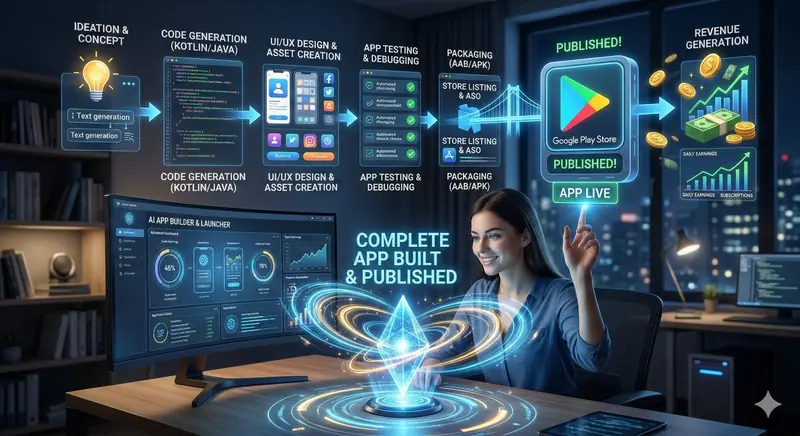
Before we get into the weeds, let's look at the full journey of building and publishing an app. There are roughly seven stages involved, and ChatGPT plays a different role in each one. Some stages it handles brilliantly. Others? Not so much. Understanding this distinction is what separates the people who actually ship apps from the ones who give up after three days.
Stage 1: Ideation and Concept
This is where ChatGPT genuinely shines, and honestly, it might be the most underrated part of the whole process. Coming up with a profitable app idea isn't about having some once-in-a-lifetime eureka moment. It's about identifying gaps in the market, understanding what people are already searching for, and finding problems you can solve with a relatively simple application.
You can literally ask ChatGPT something like: "What are the top 20 utility app categories with high demand but low competition on Google Play Store in India right now?" And it'll give you a genuinely useful list — things like habit trackers with specific niches, local language tools, budget planners for specific demographics, or educational apps for competitive exam prep. Then you can dig deeper: "For the exam prep category, what features would make a new app stand out from the existing ones?" The back-and-forth conversation helps you refine an idea that's not just cool, but actually viable.
I've found ChatGPT particularly good at helping you think through monetization strategies during the ideation phase itself. Will this app work better as freemium? Should you use ads or subscriptions? What's the expected user retention for this category? These are questions most first-time developers skip, and skipping them is exactly why most apps never make a single rupee.
Stage 2: Code Generation (Kotlin/Java)
Here's where things get interesting — and where most people hit their first wall. ChatGPT can absolutely generate Kotlin or Java code for Android apps. You can ask it to write entire Activities, Fragments, RecyclerView adapters, Room database implementations, Retrofit API calls, and pretty much any component you need. The code it produces is usually syntactically correct, follows modern Android development patterns, and includes helpful comments.
But here's what the hype videos don't tell you: ChatGPT generates code in isolation. It doesn't have access to your project structure. It doesn't know about the dependencies in your build.gradle file. It can't see your other files. So when it writes a Fragment that references a ViewModel, it might use a different naming convention than what the ViewModel it wrote five minutes ago actually uses. You end up spending a lot of time stitching pieces together, fixing import statements, resolving dependency conflicts, and making sure everything actually compiles.
For simple apps — think a calculator, a note-taking app, a basic quiz game, or a unit converter — ChatGPT can get you from zero to working code surprisingly fast. I managed to get a fully functional habit tracker app working within about four hours using ChatGPT for all the Kotlin code. But for anything with complex state management, multiple API integrations, or intricate navigation flows, you need at least a basic understanding of how Android development works. You don't need to be an expert, but you need enough knowledge to debug compilation errors and understand what the generated code is actually doing.
A tip that saved me hours: instead of asking ChatGPT to build the entire app at once, break it down file by file. Ask for the data model first, then the database layer, then the repository, then the ViewModel, and finally the UI. Build and test each layer before moving to the next one. This file-by-file approach catches errors early and keeps your project manageable.
Stage 3: UI/UX Design and Asset Creation
This is where ChatGPT's limitations become more obvious. It can write XML layouts for Android — LinearLayouts, ConstraintLayouts, Material Design components, custom themes, color schemes — all of that. And frankly, the layouts it generates look decent. Not award-winning, but definitely functional and professional enough for a utility app.
Where it falls short is the visual design side. ChatGPT can't create app icons, splash screens, screenshots for your store listing, or custom illustrations. For those, you're looking at tools like Canva, Figma, or AI image generators like DALL-E or Midjourney. The irony is that your Play Store listing's visual appeal is often what determines whether someone downloads your app or scrolls past it. So while ChatGPT handles the technical UI code, you still need to handle the creative visual identity separately.
That said, ChatGPT is surprisingly good at writing Material Design 3 themes. You can describe the mood and purpose of your app — "I want a calm, professional feel for a meditation app with soft blues and greens" — and it'll generate a complete theme XML with proper color tokens, typography scales, and shape configurations. That saves a lot of manual tweaking.
Stage 4: App Testing and Debugging
Testing is where the rubber meets the road, and this is honestly the stage where ChatGPT becomes more of an assistant than a builder. It can help you write unit tests using JUnit and Mockito. It can generate UI test scripts using Espresso. It can even analyze error logs if you paste them in and suggest fixes. That's all genuinely useful.
But ChatGPT cannot run your app. It can't install it on an emulator, click through screens, check if layouts render correctly on different screen sizes, or verify that the back button behaves properly. Automated testing catches logical bugs, but real-world testing requires actually running the application. And that means you need Android Studio installed on your computer with a working emulator or a physical device plugged in.
The debugging workflow that worked best for me was a cycle: build the app in Android Studio, test it manually, paste any crash logs or error messages into ChatGPT, get the fix, apply it, and repeat. ChatGPT is remarkably good at interpreting stack traces and explaining what went wrong in plain English. But the actual testing loop is something you do yourself.
Stage 5: Packaging (AAB/APK)
Once your app is tested and working, you need to package it into an Android App Bundle (AAB) or APK file for Play Store submission. ChatGPT can walk you through the entire process step by step — generating signing keys using keytool, configuring your build.gradle for release builds, enabling ProGuard or R8 code shrinking, setting up version codes and version names, and producing the final signed bundle.
This part is actually pretty mechanical, and ChatGPT handles the instructions perfectly. It's essentially a checklist of commands and configurations, and AI is great at checklists. The main gotcha is keeping track of your signing key — if you lose it, you can never update that app on the Play Store again. ChatGPT will remind you of this, but it's worth emphasizing. Store your keystore file and passwords somewhere safe. Seriously.
Stage 6: Store Listing and ASO (App Store Optimization)
Here's another area where ChatGPT is genuinely excellent. Writing a Play Store listing that ranks well requires specific skills — keyword research, compelling descriptions, localized content, and feature graphics that highlight your app's value proposition. ChatGPT can generate all of the text-based elements:
- App Title: Optimized for your primary keywords while staying under the 30-character limit
- Short Description: The 80-character pitch that shows up before users tap "read more"
- Full Description: A detailed, keyword-rich description with proper formatting, emoji usage, and feature highlights
- Release Notes: Professional update logs that build user confidence
- Privacy Policy: A legally adequate privacy policy page (though I'd recommend having a professional review it for serious apps)
ASO is basically SEO for apps, and just like web SEO, the words you choose in your title and description directly impact how discoverable your app is. ChatGPT understands search intent and can help you target long-tail keywords that your competitors are missing. This is where a lot of indie developers leave money on the table — they write a boring description, pick an obvious title, and wonder why nobody finds their app.
Stage 7: Publishing and Going Live
Publishing to the Google Play Store requires a Google Play Developer account, which costs a one-time fee of $25 (roughly ₹2,100). After that, the process involves filling out several forms — content rating questionnaires, data safety declarations, target audience settings, and uploading your AAB file along with screenshots, feature graphics, and your app icon.
ChatGPT can guide you through every single form, explain what Google means by each question (some of them are surprisingly confusing), and help you fill out the data safety section accurately. The data safety declaration, in particular, trips up a lot of first-time developers because you need to honestly declare what data your app collects, stores, and shares. Get this wrong and Google will reject your app or worse — pull it down after publishing.
The review process typically takes anywhere from a few hours to a few days. Google's automated systems check for policy violations, malware, and content issues. If everything passes, your app goes live. And just like that, you're a published developer.
The Money Question — How Do People Actually Earn From These Apps?
Alright, let's talk about the part everyone really cares about. Can you actually make money? Yes, but let me set realistic expectations because the internet is full of wildly exaggerated income claims.
Revenue Stream 1: Google AdMob (Ad Revenue)
This is the most common monetization method for free apps. You integrate Google AdMob into your app, display banner ads, interstitial ads, or rewarded video ads, and earn money based on impressions and clicks. ChatGPT can generate the entire AdMob integration code — from adding the dependency to placing ad views in your layouts to handling ad lifecycle events.
Realistic earnings? For a new app with 1,000 daily active users in India, you're looking at roughly ₹200 to ₹800 per day from ads, depending on your niche and ad placement. That's not life-changing money, but it's passive income that grows as your user base grows. Scale to 10,000 daily users and you're in the ₹2,000 to ₹8,000 per day range. Some niche utility apps in finance or education sectors earn significantly more because advertisers pay higher CPMs for those audiences.

Revenue Stream 2: In-App Purchases and Subscriptions
If your app provides ongoing value — like a fitness tracker, language learning tool, or productivity app — subscriptions can be far more lucrative than ads. Google takes a 15% cut (down from 30% for the first $1 million in annual revenue thanks to the Indie Developer Program), and you keep the rest.
ChatGPT can help you implement Google Play Billing Library integration, design your subscription tiers, and even write the marketing copy for your premium offering. The technical implementation is moderately complex — subscription state management, grace periods, account holds, purchase verification — but ChatGPT can generate working code for all of it if you feed it the requirements methodically.
Revenue Stream 3: Paid Apps
You can simply charge for your app upfront. This works best for specialty tools that solve a very specific problem — a professional-grade calculator for a niche field, a specialized converter, or a professional tool that people need daily. The challenge is that paid apps have much lower download rates than free ones, so your app needs to offer clear, immediate value that justifies the price tag.
Revenue Stream 4: The Portfolio Play
Here's something nobody talks about. Even if your first few apps don't make much money directly, having published apps on the Play Store is an incredible portfolio piece. It demonstrates that you can ship products, understand the full development lifecycle, and build things people actually use. If you're a student or early-career professional, this can be worth more than the ad revenue itself. Freelance clients, employers, and startup cofounders all want to work with people who have shipped real products.

What You Still Need Besides ChatGPT
Let's be really clear about what ChatGPT cannot replace in this process:
- Android Studio: You absolutely need this IDE installed on your computer. All the code ChatGPT generates needs to be compiled, built, and tested somewhere. There's no way around this. It's free, but you need a reasonably capable computer to run it smoothly.
- A Google Play Developer Account: The $25 one-time fee is mandatory. No exceptions.
- Basic Debugging Skills: When code doesn't compile (and it won't, on the first try), you need to be able to read error messages and know roughly where things went wrong. You don't need to be a senior developer, but you need to understand the basics.
- Design Tools: Canva, Figma, or at minimum a screenshot tool for creating your Play Store listing assets.
- Patience: Your first app will take longer than you expect. The second one will be much faster. By your fifth app, you'll have a workflow that moves quickly.
AI App Builder Platforms — The No-Code Alternative
If you've looked at this pipeline and thought "that still sounds like a lot of technical work," you're right. And that's exactly why a whole category of AI App Builder platforms has exploded in 2026. Tools like FlutterFlow, Adalo, Thunkable, and newer AI-powered platforms let you describe your app in natural language and generate a working prototype with drag-and-drop interfaces.
Some of these platforms even handle the packaging and Play Store submission for you. The trade-off? You have less control over the code, the apps tend to be larger in file size, and you're locked into the platform's ecosystem. For simple utility apps, though, these builders can get you from idea to published app in a single weekend — which is genuinely impressive.
ChatGPT can actually help you decide which approach suits your situation better. Describe your app idea, your technical comfort level, and your timeline, and it'll give you a sensible recommendation on whether to go the coding route or the no-code route.

Common Mistakes That Kill Most AI-Built Apps
I've seen dozens of people try this approach and fail. The failures almost always come down to the same handful of mistakes:
- Building Something Nobody Wants: Technical capability doesn't matter if there's no market demand. Before writing a single line of code, validate that real people actually need your app. Check Play Store reviews of competing apps — what are users complaining about? Build something that solves those specific complaints.
- Ignoring Google's Play Store Policies: Google has strict rules about ad placement, data collection, content, and permissions. Many AI-generated apps get rejected because they request unnecessary permissions, place ads too aggressively, or violate content policies. Read the policies before you build, not after.
- Publishing and Forgetting: Apps need updates. Users report bugs, Android releases new versions, and competitors improve their offerings. An app you published and never touched again will slowly sink in the rankings and eventually get removed by Google for targeting outdated API levels. Budget at least a few hours per month for maintenance.
- Copying Existing Apps Exactly: Google's review team isn't stupid. If your app is a pixel-perfect clone of an existing popular app with no added value, it'll get flagged for spam or impersonation. Use existing apps as inspiration, not as templates to copy.
- Skipping Testing: When ChatGPT generates code that compiles successfully, it's tempting to ship it immediately. Don't. Test every screen, every button, every edge case. A crash on first launch means a one-star review, and recovering from that is nearly impossible.
A Realistic Timeline — From Zero to Published
Here's what a realistic timeline looks like if you're starting from scratch with almost no coding experience and using ChatGPT as your primary development tool:
- Week 1: Learn Android Studio basics, set up your development environment, understand project structure. ChatGPT can be your tutor here — just say "Explain Android Studio project structure to me like I'm a complete beginner."
- Week 2: Build your first practice app — something simple like a tip calculator or a to-do list. Don't try to publish this. It's just for learning the workflow.
- Week 3-4: Build your actual app. Use ChatGPT for all the code, but test rigorously as you go. Design your app icon and store listing assets.
- Week 5: Test extensively, fix bugs, optimize performance, and create your Play Store listing. Submit for review.
Five weeks from zero to published app is realistic. Some people do it faster, some slower. The point is that this isn't a one-afternoon miracle — it's a project that requires actual effort and learning. But it's also completely achievable for anyone willing to put in the time.
"The best time to start building apps was five years ago. The second best time is right now — and you've never had better AI tools to help you do it."
The Honest Bottom Line
So, can you build a complete app using just ChatGPT and publish it on the Play Store to earn money? Yes — with caveats. ChatGPT is an incredibly powerful assistant that handles ideation, code generation, testing guidance, store listing optimization, and troubleshooting beautifully. But it's not a magic button. You still need Android Studio, basic problem-solving skills, design assets, and the patience to debug things when they break.
The people who succeed with this approach treat ChatGPT as a multiplier, not a replacement. They bring the ideas, the judgment calls, and the persistence. ChatGPT brings the technical execution speed. Together, that combination is genuinely powerful enough to build real, revenue-generating apps.
If you're a student, a side hustler, or someone curious about app development, there's never been a lower barrier to entry than right now. The tools are free (or nearly free), the knowledge is accessible, and the market for useful apps is still growing. The only question is whether you'll actually start.
Go build something. Seriously. Your first app doesn't need to be perfect — it just needs to exist. Everything else comes after that first publish.