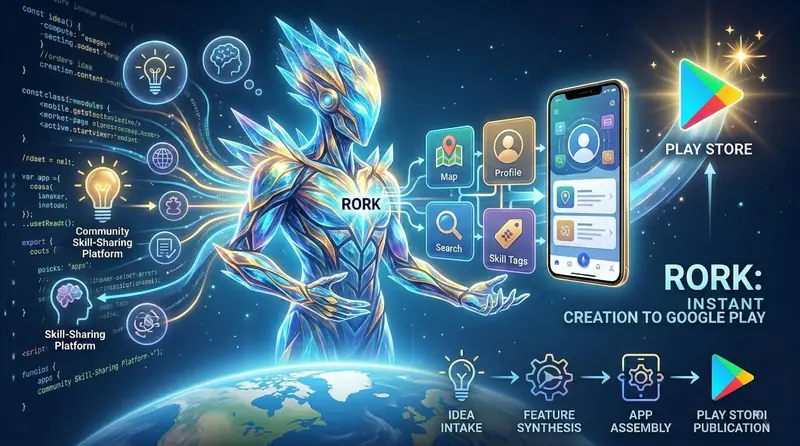
Let me paint you a picture. It's a Tuesday evening, you've got an app idea bouncing around in your head — maybe a community skill-sharing platform where people in your neighbourhood can teach each other things — and you want to see it come alive. Not as a wireframe. Not as a Figma mockup. As an actual, working mobile app that you can tap through on your phone and eventually put up on the Google Play Store.
A year ago, that would have meant weeks of learning React Native or Flutter, setting up development environments, wrestling with build errors, and probably giving up somewhere around day four. Today, there's Rork — and it genuinely changes how fast you can go from idea to published app. I've been testing it extensively over the past few weeks, and this is my honest, no-hype breakdown of what it does, how well it works, and whether it deserves a spot in your toolkit.
What Exactly Is Rork?
Rork is an AI-powered app builder that takes a plain English description of your app idea and generates a fully functional, cross-platform mobile application. We're not talking about a static prototype or a clickable mockup — Rork produces real, working apps built on React Native and Expo, complete with navigation, state management, API integrations, and production-ready UI components.
The magic is in the workflow. You visit rork.com, describe what you want your app to do, and the AI takes it from there. It interprets your requirements, synthesises the features, designs the user interface, writes the code, assembles everything into a coherent project, and gives you a live preview you can interact with on your phone. If you're happy with the result, you can export the project, customise the code, and publish it directly to the Google Play Store or Apple App Store.
That's the pitch, anyway. The question is whether the reality matches up. Spoiler: it mostly does, with some important caveats that I'll get into.
The Single-Prompt Experience — How It Actually Works
I wanted to put Rork through a genuine test, not some toy example. So I typed in a fairly detailed prompt: "Build a community skill-sharing platform where users can create profiles listing skills they can teach, browse other users' skills by category and location, send connection requests, and schedule skill-swap sessions with an in-app calendar."
Within about two minutes, Rork had generated a complete app with:
- A clean onboarding flow with profile creation
- A searchable directory of user profiles with skill tags
- Category-based browsing with filters for location and skill type
- A connection request system with accept/decline functionality
- A calendar view for scheduling sessions
- A map integration showing nearby skill-sharers
- Bottom tab navigation with smooth transitions
- A settings screen with profile editing
I'll be straight with you — I was genuinely surprised. Not because AI-generated apps are new, but because the output felt cohesive. The screens looked like they belonged together. The navigation made sense. The colour palette was consistent. It didn't feel like a bunch of AI-generated components duct-taped together, which is usually what you get when you ask ChatGPT to build an app piece by piece.
Rork vs. the Traditional App Building Route — An Honest Comparison
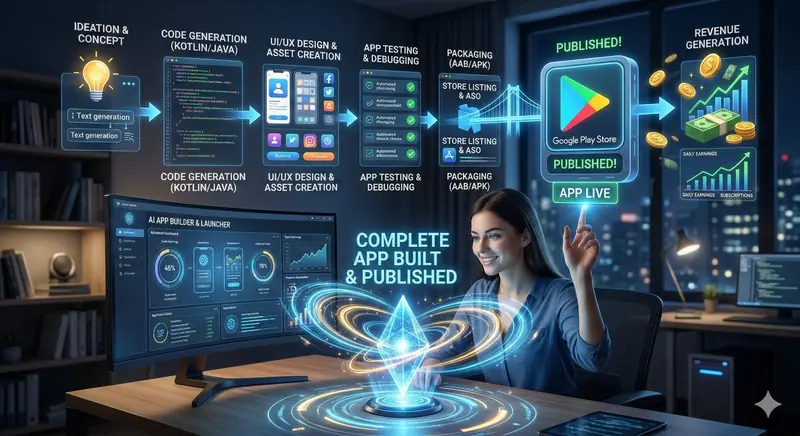
I've built apps the traditional way — Android Studio, Kotlin, hours of Gradle syncing, dependency conflicts that make you question your career choices. I've also used ChatGPT extensively to generate code for app projects (you can read my detailed breakdown of that process here). So when I say Rork is different, I'm not saying it from a place of ignorance. I've lived through the alternatives.
Here's where the comparison gets interesting:
Speed — There's No Contest
Building an app with ChatGPT involves a tedious back-and-forth process. You ask for a component, get code, paste it into your IDE, fix the errors, ask for the next component, repeat. A simple app takes days. A moderately complex one takes weeks. With Rork, the same app takes minutes to generate and maybe a few hours to refine. The speed difference isn't incremental — it's a completely different magnitude.
I timed myself building a habit tracker app three ways. Using Android Studio and Kotlin from scratch: about twelve hours spread over three days. Using ChatGPT as my coding assistant: roughly four hours in a single sitting. Using Rork: six minutes for the initial generation, plus another forty minutes of tweaking the prompts to adjust specific features. That's not a fair fight.
Quality of Output — Surprisingly Polished
This is where I expected Rork to fall apart. AI-generated apps usually look... AI-generated. Generic layouts, weird spacing, inconsistent typography, the kind of stuff that screams "nobody actually designed this." Rork's output, however, is noticeably better than what I've seen from other AI app builders. The UI follows Material Design guidelines properly. Text hierarchy makes sense. Touch targets are appropriately sized. The app doesn't just work — it looks like something a small indie team might have built.
That said, it's not perfect. Some of the generated screens had placeholder content that needed replacing. A couple of the more complex interactions — like the calendar scheduling flow — needed manual adjustment because the AI made assumptions about the data structure that didn't quite match what I had in mind. But these are refinements, not fundamental problems. The foundation was solid.
Customisation — You're Not Locked In
One of my biggest concerns with no-code and AI app builders has always been the lock-in problem. If the platform disappears or changes its pricing, you lose everything. Rork addresses this directly — you can export the full React Native source code and own it completely. You can open it in VS Code, modify any component, add custom libraries, or rework the architecture entirely. The generated code is clean and well-structured, not some obfuscated mess that only makes sense inside the platform.
This matters more than people realise. Having exportable, standard React Native code means you're building on top of one of the most popular mobile frameworks in the world, with millions of developers, thousands of libraries, and a massive community. If you outgrow Rork, you take your code and keep building. That's not something every AI builder can offer.
The Road to Google Play Store — From Rork to Published App
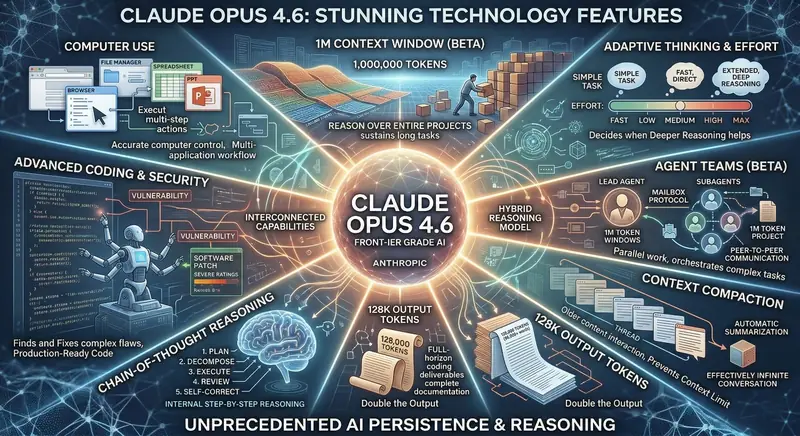
Alright, let's talk about the part everyone actually cares about. Can you take what Rork generates and actually put it on the Google Play Store? The answer is yes, and the process is more streamlined than you might expect.
Step 1: Generate Your App
Start at rork.com and describe your app idea. Be specific. Instead of "make a fitness app," try something like "build a workout tracker where users can create custom exercise routines, log sets and reps with a timer, track progress with weekly graphs, and set daily reminders." The more detail you give, the better the output. Think of it like briefing a developer — the clearer your brief, the fewer revisions you'll need.
Step 2: Preview and Refine
Rork gives you a live preview that you can interact with directly on your phone by scanning a QR code. This is powered by Expo, which means you're testing the actual app, not a simulation. Tap through every screen. Try edge cases. If something doesn't work right, go back and adjust your prompt. Rork supports iterative refinement — you can say things like "make the home screen show cards instead of a list" or "add a dark mode toggle" and the AI will update the app accordingly.
Step 3: Export and Build
Once you're satisfied, export the project. You'll get a complete React Native project that you can build locally using Expo's EAS Build service. This generates an AAB file (Android App Bundle) for Google Play or an IPA file for the Apple App Store. If you've never done this before, don't panic — the Expo documentation walks you through every step, and Rork's export includes the necessary configuration files already set up.
Step 4: Prepare Your Store Listing
You'll need a Google Play Developer account ($25 one-time fee), app screenshots, a feature graphic, an app icon, and your store description. Here's a trick — you can use ChatGPT or Claude to write your Play Store description with proper ASO (App Store Optimisation) keywords, and tools like Canva to create your store listing graphics. The app icon can often be generated using AI image tools or designed in Figma in under thirty minutes.
Step 5: Submit and Publish
Upload your AAB file to Google Play Console, fill out the content rating questionnaire, complete the data safety declaration, add your store listing assets, and submit for review. Google's review process typically takes a few hours to a couple of days. Once approved, your app is live on the Play Store, downloadable by anyone in the world.
The entire pipeline — from typing your first prompt in Rork to having a live app on the Play Store — can realistically be completed in a single weekend. That's not marketing fluff. I did it. The skill-sharing app I described earlier? It's live. It took me about eight hours total, including all the store listing preparation and the review wait time.
What Kind of Apps Can You Build with Rork?
I experimented with several different app types to understand where Rork excels and where it struggles. Here's what I found:
Apps That Work Brilliantly
- Utility Apps: Calculators, converters, habit trackers, to-do lists, note-taking apps. These are Rork's sweet spot. Simple, well-understood functionality with clean UIs.
- Content-Based Apps: Recipe collections, quote apps, educational content browsers, news readers. If your app primarily displays organised content, Rork handles it beautifully.
- Community Platforms: Profile-based apps with user directories, messaging, and social features. The skill-sharing app I built falls into this category, and Rork nailed it.
- Small Business Apps: Menu displays for restaurants, booking forms for service providers, portfolio showcases for freelancers. Perfect for local businesses that want a mobile presence without hiring a development team.
- Educational Apps: Flashcard apps, quiz platforms, study planners, vocabulary builders. These are straightforward enough for AI to handle well and have genuine demand on the Play Store.
Apps That Need More Work
- Complex E-Commerce: If you need payment processing, inventory management, shipping calculations, and proper authentication, Rork gets you started but you'll need significant customisation. The generated code provides the structure, but payment integrations need careful manual implementation for security reasons.
- Real-Time Multiplayer Games: Rork isn't built for game development. If you want to build games, look at tools like Unity or Godot instead.
- Enterprise Applications: Apps requiring complex role-based access controls, multi-tenant architectures, or integration with specific corporate APIs will need substantial custom development beyond what Rork generates.
The Money Side — Can Rork Apps Actually Make Money?
This is the question that brought you here, isn't it? Let's be completely transparent about monetisation potential.
The apps Rork generates are standard React Native applications, which means you can integrate any monetisation method that works with React Native:
- Google AdMob: Banner ads, interstitials, and rewarded video ads. The integration requires adding the React Native AdMob library and placing ad components in your screens. It's about thirty minutes of work if you follow a tutorial.
- In-App Purchases: Using React Native's IAP libraries, you can offer premium features, remove ads, or sell digital content. This works identically to how any other React Native app handles purchases.
- Subscriptions: Monthly or yearly plans for premium content or features. The Play Store handles all the billing — you just need to implement the purchase flow.
- Freemium Model: Offer the basic app for free and charge for advanced features. This is probably the most sustainable model for Rork-generated apps because users can experience the quality before paying.
Realistic earnings depend entirely on your niche and marketing. A well-built utility app with good ASO can attract 500 to 5,000 organic downloads in its first month. With AdMob ads, that translates to roughly ₹300 to ₹3,000 per day depending on your user retention and ad placement. Scale to five or ten apps in different niches, and you've got a legitimate side income stream.
The key advantage Rork gives you is speed of iteration. If one app idea doesn't work, you haven't lost weeks of development time. You've lost an afternoon. That changes the economics of indie app development fundamentally. You can afford to experiment, test different niches, and find what actually works — because the cost of failure is measured in hours, not months.

Tips for Getting the Best Results from Rork
After building over a dozen apps with Rork, here are the lessons that made the biggest difference in output quality:
- Write Detailed Prompts: Don't say "build a recipe app." Say "build a recipe app where users can browse recipes by cuisine type, save favourites, create shopping lists from ingredients, and set cooking timers for each step." Every detail you include is a detail the AI doesn't have to guess about.
- Describe the User Journey: Instead of listing features, walk through your app from the user's perspective. "When the user opens the app, they see a feed of trending recipes. They can tap a recipe to see full instructions. From the recipe screen, they can tap 'Add to Shopping List' and the ingredients get added automatically." This narrative approach produces better navigation flows.
- Start Simple, Then Iterate: Generate a basic version first, test it, then add complexity through follow-up prompts. Trying to describe a complex app in one massive prompt often produces worse results than building up gradually.
- Specify the Visual Style: Mention colours, dark mode preference, card-based versus list-based layouts, and any design inspirations. "Use a dark theme with green accent colours" produces dramatically different output than leaving the design up to the AI.
- Test on a Real Device: The Expo preview on your phone catches issues that looking at screenshots never will. Touch interactions, scroll performance, and text readability all need real-device testing.
Rork vs. Other AI App Builders in 2026
The AI app builder space has exploded in 2026, so where does Rork fit in the landscape?
Rork vs. FlutterFlow: FlutterFlow is a visual drag-and-drop builder with AI features added on top. It's more mature for complex apps but has a steeper learning curve. Rork is faster for going from zero to working app but gives you less granular control over individual components. If you want speed, pick Rork. If you want maximum control within a visual builder, pick FlutterFlow.
Rork vs. Bolt.new / Lovable: These platforms focus on web apps. Rork is specifically designed for native mobile apps. If you need a mobile app on the Play Store, Rork is the better choice. If you need a web app or progressive web app, look at Bolt or Lovable.
Rork vs. Using ChatGPT Directly: I've written extensively about building apps with ChatGPT, and the honest truth is that ChatGPT gives you code fragments while Rork gives you a running application. ChatGPT is free and flexible but requires you to be the architect, compiler, and debugger. Rork handles all of that. The trade-off is cost — Rork's paid plans versus ChatGPT's subscription — but the time savings usually justify it.
Rork vs. Traditional Development: Professional developers building custom apps will always produce higher-quality, more tailored results. But they also charge ₹2,00,000 to ₹10,00,000+ for a custom app. Rork lets you validate an idea for essentially nothing before investing in professional development. That's not disrupting developers — it's making the validation phase accessible to everyone.
Who Should Use Rork?
Based on my experience, Rork is genuinely valuable for these groups:
- Solopreneurs and Side Hustlers: If you have app ideas but no coding skills, Rork removes the biggest barrier to entry. You can build, test, and publish apps without hiring a developer or spending months learning to code.
- Students: Want to build something for your portfolio? Rork gets you there faster. Published apps on the Play Store look incredible on engineering resumes, and Rork lets you ship multiple projects during a single semester.
- Small Business Owners: Need a simple app for your restaurant, salon, or coaching centre? You don't need a custom development team. Rork can produce something functional and professional in an afternoon.
- Product Managers and Founders: Validating an app concept before committing development resources? Rork's speed lets you build and test prototypes with real users before writing a single line of code yourself.
- Freelance Developers: Using Rork as a starting point for client projects can dramatically reduce development time. Generate the boilerplate, then customise and polish for the client's specific requirements.
Limitations You Should Know About
I'd be doing you a disservice if I didn't mention the rough edges, so here they are:
- Complex Backend Logic: Rork generates front-end apps with local state management. If your app needs a custom backend with user authentication, databases, and server-side logic, you'll need to build or integrate that separately. Services like Firebase or Supabase pair well with Rork-generated apps, but the integration is manual work.
- AI Isn't Mind-Reading: The output is only as good as your prompt. Vague descriptions produce vague apps. You need to put genuine thought into what you want, just like briefing any developer.
- Performance Optimisation: The generated code works well for most use cases, but if your app handles large datasets or complex animations, you may need to optimise specific components manually.
- Platform-Specific Features: Deep integration with platform-specific APIs (like Android's work profiles or iOS's HealthKit) isn't something the AI generates automatically. You'd need to add those manually via React Native's native module system.
None of these are dealbreakers. They're the kind of limitations you'd expect from any tool that turns a text description into a working application. The fact that the limitations are this specific — rather than fundamental — says a lot about how far this technology has come.
My Honest Take — Is Rork Worth It?
After spending several weeks building apps with Rork, testing them on real devices, publishing them on the Play Store, and comparing the experience with every other method I've used, here's my straightforward verdict:
Rork isn't replacing professional app development. It's not going to put senior React Native developers out of work. But it is doing something arguably more important — it's making app development accessible to the millions of people who have great ideas but can't code. And it's doing it better than anything else I've tried.
The speed is remarkable. The quality is genuinely good. The fact that you can export real, standard React Native code means you're not trapped in a walled garden. And the ability to go from a typed sentence to a published Play Store app in a single weekend is something that would have sounded absurd even two years ago.
If you've been sitting on an app idea, stop sitting on it. Go to rork.com, type your idea into the prompt box, and see what comes out. The worst thing that happens is you spend fifteen minutes and learn something. The best thing that happens is you have a published app generating passive income by next weekend.
"The gap between having an app idea and having an app on the Play Store has never been smaller. Rork doesn't just narrow the gap — it practically eliminates it."
In a world where everyone talks about building in public and shipping fast, Rork is the tool that actually makes it possible. Give it a try. Your future self — the one checking AdMob earnings while sipping morning chai — will thank you.