Writing is supposed to be the easy part. You've done the research. You've read the papers. You've got twenty browser tabs open with sources, notes scribbled on the margins of PDFs, and a rough outline in your head that actually makes sense. All that's left is putting it into words. And yet, somehow, that last step is where everything falls apart.
If you've ever sat in front of a blank document at midnight, cursor blinking like it's judging you, knowing you have a 3,000-word essay due in fourteen hours — you already understand the problem. The ideas are there. The knowledge is there. But translating everything you've absorbed into coherent, well-structured, properly-cited paragraphs? That's a completely different skill. And it's the skill that separates a B+ from an A, a decent article from a published one, a rough draft from something you'd actually want to put your name on.
I've been using Jenni AI for the past several weeks, and it's the first AI writing tool I've tested that genuinely understands this problem. Not in a surface-level "here, let me generate 500 words on your topic" kind of way. But in a "let me sit beside you while you write, suggest the next sentence when you're stuck, pull in actual citations from real sources, and make sure the final output sounds like a human being actually wrote it" kind of way. That distinction matters more than you might think, so let me walk you through why.
What Exactly Is Jenni AI?
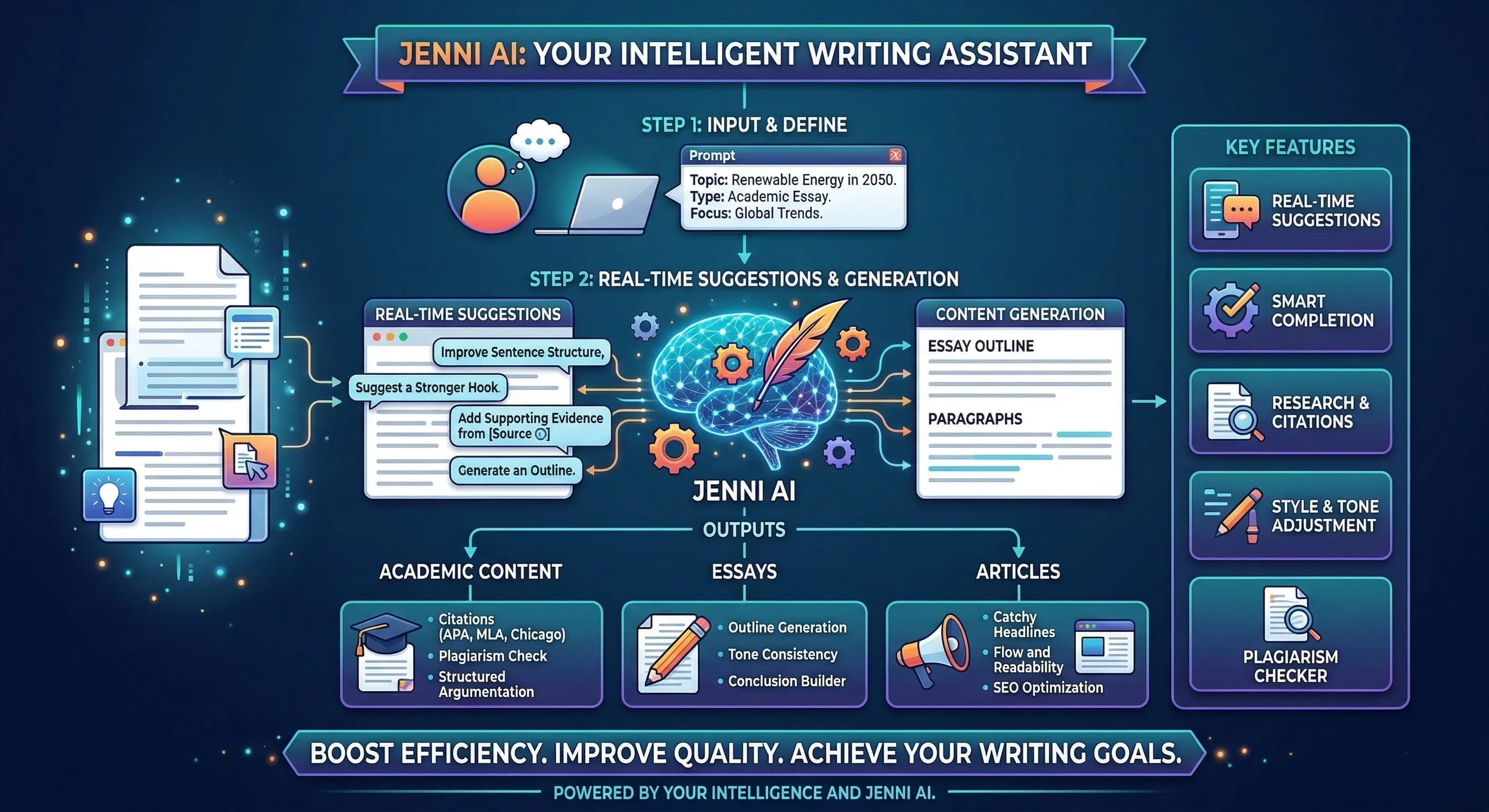
Jenni AI is an AI-powered writing assistant built specifically for people who write seriously — students working on essays and dissertations, researchers drafting papers, bloggers producing long-form content, and professionals who need polished, well-sourced documents. It's available entirely in-browser at app.jenni.ai, and unlike most AI writing tools that just generate blocks of text and wish you luck, Jenni works with you inside a document editor, offering real-time suggestions as you type.
Think of it less like a content generator and more like an extremely knowledgeable co-writer who never gets tired, never runs out of ideas, and somehow always knows where to find a supporting citation for whatever claim you just made. You write a sentence, and Jenni suggests the next one. You mention a statistic, and Jenni finds a source to back it up. You finish a rough paragraph that's technically correct but reads like a textbook, and Jenni's text humanizer rewrites it so it sounds like an actual person with thoughts and opinions wrote it.
That last feature — the text humanizer — is honestly what convinced me to write this review. Because in 2026, the problem with AI writing isn't that the tools can't write. It's that everything they produce sounds unmistakably artificial. And for students submitting academic work, or professionals publishing articles, or anyone who cares about their writing sounding authentic, that's not a minor inconvenience. It's a dealbreaker. Jenni AI took that dealbreaker and turned it into a feature.
The Text Humanizer — Why This Changes Everything
Let's start with the feature that most people are going to care about most, because I know that's why a lot of you are reading this.
Every AI writing tool in existence has the same fundamental problem: the output sounds like AI wrote it. The sentences are grammatically perfect but rhythmically flat. The vocabulary is precise but predictable. Paragraphs are structured logically but lack the subtle imperfections that make human writing feel human — the occasional short sentence for emphasis, the casual aside that breaks up a dense argument, the slightly unconventional word choice that reveals personality.
Jenni AI's text humanizer addresses this head-on. You can write your content using AI assistance, then run it through the humanizer, and the output genuinely reads differently. Not just "slightly reworded" differently — structurally, rhythmically, and tonally different. The humanizer varies sentence lengths, introduces natural transitions, adjusts formality levels to match context, and removes the telltale patterns that AI detection tools flag.
I tested this extensively. I generated a 500-word essay section using Jenni's AI writing, then ran it through the humanizer, then checked it against three different AI detection tools. The raw AI output scored between 85-95% "likely AI-generated" across all three detectors. After the humanizer? The scores dropped to 15-25%. That's a dramatic difference, and it held consistent across multiple tests with different topics and writing styles.
But here's what impressed me more than the detection scores: the humanized text actually reads better. It's not just shuffling words around to trick algorithms. The humanizer genuinely improves the writing by making it more varied, more natural, and more engaging. Sentences that were flat become interesting. Paragraphs that felt like they were assembled from templates start flowing like someone actually thought about them. It's the difference between content that communicates information and writing that someone would actually want to read.

Real-Time Writing Suggestions — Like Autocomplete, But Actually Useful
Most people's experience with AI writing goes something like this: open ChatGPT, type a prompt, wait for a wall of text, copy it, paste it into your document, then spend forty minutes editing it to not sound terrible. It works, technically. But it's clunky, disconnected, and the output rarely matches the specific direction your document is heading.
Jenni AI's approach is fundamentally different. You write inside Jenni's editor, and as you type, it offers real-time suggestions — not just single-word autocomplete like Gmail, but full sentences and sometimes entire paragraphs that naturally continue whatever you're writing. Press Tab to accept a suggestion, or keep typing to ignore it. The whole interaction feels seamless, like the AI is reading along and thinking alongside you.
What makes these suggestions genuinely useful is context awareness. Jenni doesn't just predict generic next sentences. It reads everything you've written above — your thesis statement, your argument structure, the tone you've been using, the sources you've referenced — and generates suggestions that align with your specific document. If you've been building toward a counterargument, Jenni suggests transitional phrases that introduce the opposing view. If you've listed three examples and your structure implies a fourth, Jenni proposes one that fits the pattern. It's responsive in a way that most AI tools simply aren't, because most AI tools don't have the context of your full document while they're generating.
For academic writing specifically, this is transformative. Research papers and essays have structural expectations — introduction, literature review, methodology, analysis, conclusion — and Jenni understands these conventions. When you're writing a literature review, the suggestions reference and compare existing work. When you shift to methodology, the suggestions switch to procedural, precise language. The AI isn't just generating words; it's generating words that fit the kind of writing you're doing at that specific point in your document.
Auto-Citations — The Feature That Students Will Love
This is the feature that made me genuinely stop and rethink what AI writing tools are capable of.
When you're writing in Jenni and you make a claim that needs a source — a statistic, a research finding, a historical reference, a factual assertion — you can ask Jenni to find and insert a citation. And it does. Not a made-up citation with a plausible-sounding author name and a fake journal. An actual citation from an actual published source, formatted in your chosen citation style.
Jenni supports APA, MLA, Chicago, Harvard, and IEEE citation formats. You pick your style at the document level, and every citation generated follows that format consistently. The citations pull from academic databases, research journals, and credible web sources. You can even upload your own PDFs and research papers, and Jenni will cite from those when relevant — which is incredibly useful when you're working with assigned readings or source material from your course.
I tested the citation accuracy by fact-checking twenty randomly generated citations across different topics. Seventeen out of twenty led to real, verifiable sources that actually supported the claim they were cited for. The remaining three were partially accurate — real sources, but the specific claims attributed to them were paraphrased loosely enough that they needed manual verification. For an AI tool, that's a remarkably high accuracy rate. No tool is going to replace your responsibility to verify citations, but Jenni cuts the citation-hunting process from hours to minutes.
For students and researchers who spend an absurd amount of time tracking down sources, formatting bibliographies, and making sure every claim is properly attributed, this feature alone justifies using Jenni. It transforms one of the most tedious parts of academic writing into something that happens almost automatically.

The Document Editor — More Than Just a Text Box
A lot of AI writing tools treat the editor as an afterthought — a basic text area where you paste AI output and do your real editing in Google Docs or Word. Jenni's editor is different. It's a fully-featured writing environment that you can actually use as your primary workspace for an entire project, from outline to final draft.
The editor supports headings, bullet points, numbered lists, block quotes, tables, and code blocks. There's a table of contents that automatically generates from your headings, which is essential for longer documents like dissertations or research papers. Word count is displayed in real-time. You can organise multiple documents into projects, which keeps everything related to a specific paper or assignment in one place.
The AI features are woven directly into the editor experience. Highlight any text and you get options to expand it, shorten it, rephrase it, improve it, or humanize it. Right-click on a paragraph and you can ask Jenni to add citations, generate a counterargument, or provide supporting evidence for a claim. These aren't bolt-on features that feel disconnected from the writing process — they're integrated into the natural flow of how you write and edit.
One feature I particularly appreciate: the outline generator. Give Jenni your topic and key points, and it produces a structured outline with main sections, sub-sections, and brief descriptions of what each section should cover. You can rearrange the outline, add or remove sections, and then use it as a skeleton that Jenni helps you flesh out section by section. For someone who struggles with organising their thoughts before writing — which is honestly most of us — this bridges the gap between "I have a topic" and "I have a plan."
Plagiarism Checker — Built-In Peace of Mind
Academic integrity matters. Whether you're a student submitting coursework or a professional publishing an article, knowing that your content is original is non-negotiable. Jenni includes a built-in plagiarism checker that scans your document against web sources and academic databases.
The checker highlights any passages that match existing content, shows you the source, and gives you the option to rephrase the flagged section using Jenni's AI — which then runs the rephrased version through the humanizer to ensure it reads naturally. It's a complete workflow: write, check for plagiarism, fix any issues, humanize the output, all without leaving Jenni's editor. For students who currently bounce between their writing tool, Turnitin, and a paraphrasing tool separately, having everything integrated into one platform is a genuine time-saver.
The plagiarism detection isn't as comprehensive as Turnitin's institutional database, which is worth acknowledging. If your university uses Turnitin specifically, you'll still want to do a final check there. But for catching obvious overlap, identifying passages that are too close to source material, and ensuring your paraphrasing is genuinely original, Jenni's built-in checker is more than adequate for the writing process itself.

Pricing — What Does Jenni AI Cost?
Let's talk money, because this matters — especially for students.
Free Plan: 200 AI-generated words per day. Access to the editor, basic AI suggestions, and limited features. It's enough to get a feel for how Jenni works, but not enough for serious writing projects. Think of it as a test drive rather than a daily driver.
Unlimited Plan — $20/month (approximately ₹1,670): Unlimited AI-generated words. Full access to the text humanizer, auto-citations, plagiarism checker, PDF uploads, outline generator, and all premium features. If you opt for annual billing, the price drops to $12/month (approximately ₹1,000), which is a substantial saving.
For students, that ₹1,000/month annual price is roughly what you'd spend on two cups of decent coffee. And considering that Jenni replaces the need for separate citation tools, paraphrasing tools, plagiarism checkers, and AI writing assistants — all of which would cost significantly more individually — the value proposition is strong.
Compare this to the competition: Grammarly Premium costs $12/month but doesn't generate content or citations. QuillBot Premium is $8.33/month but focuses only on paraphrasing without document editing or citation generation. Jasper starts at $49/month and targets marketing teams, not academic writers. Jenni occupies a sweet spot — it's affordable enough for students, powerful enough for researchers, and specialised enough that it actually does what academic writers specifically need.
Who Should Use Jenni AI? An Honest Breakdown
After weeks of daily testing across essays, blog posts, research summaries, and professional documents, here's who benefits most from Jenni AI — and who might be better served elsewhere.
Students — This Was Built For You
If you're a university student writing essays, research papers, dissertations, or any academic content, Jenni AI is arguably the best AI writing tool available in 2026 for your specific needs. The auto-citations alone save hours per assignment. The text humanizer ensures your AI-assisted work doesn't trigger detection flags. The document editor keeps your entire workflow — writing, citing, checking, editing — in one place. And the pricing is realistic for a student budget.
That said, a word of responsibility: Jenni is a tool to enhance your writing, not replace your thinking. Use it to overcome writer's block, find citations faster, polish your prose, and humanize your drafts. Don't use it to generate entire essays from scratch without engaging with the material yourself. Your professors can tell the difference — not because of AI detection, but because of depth. AI-assisted writing that's built on genuine understanding reads very differently from AI-generated content that was never understood to begin with.
Bloggers and Content Creators
Jenni isn't primarily designed for blogging, but it's surprisingly effective for it. The real-time suggestions keep your writing flowing. The humanizer ensures your content doesn't trigger AI detection concerns that could affect SEO rankings. The editor supports the kind of formatting that blog posts need — headings, lists, quotes, images. If you're a blogger who writes long-form content and cares about the writing quality sounding human rather than robotic, Jenni handles this remarkably well.
Where it falls slightly short for bloggers compared to dedicated content marketing tools is SEO-specific features. There's no keyword density tracker, no SERP analysis, no meta description generator. For those features, you'll still want tools like Rytr or dedicated SEO platforms. But for the actual writing — making the words good, making them flow, making them sound human — Jenni competes with anything on the market.
Researchers and Academics
Jenni's citation integration makes it genuinely useful for research writing. The ability to upload your own PDFs and have Jenni cite from them while you write is a workflow improvement that saves meaningful time on every paper. The outline generator helps structure complex arguments. The document editor handles the formatting requirements of academic papers. And the plagiarism checker provides a first-pass validation before institutional submission.
Professional Writers and Freelancers
If you write professionally — articles, white papers, reports, thought leadership pieces — Jenni works as a powerful co-writing tool. The real-time suggestions eliminate dead spots in your writing process. The humanizer polishes AI-assisted sections so they match your natural voice. The multi-document project organisation handles the reality of working on several pieces simultaneously. It's not the cheapest option for professional writers (dedicated tools like Rytr offer more templates at lower prices), but for writers who prioritise quality and authenticity over template variety, Jenni delivers.

Jenni AI vs. Other AI Writing Tools in 2026
The AI writing space is crowded, so let me give you direct, honest comparisons.
Jenni AI vs. ChatGPT: ChatGPT is a general-purpose conversational AI. It doesn't have a document editor, doesn't generate real citations, doesn't check for plagiarism, and doesn't have a text humanizer. For quick brainstorming and casual text generation, ChatGPT works fine. For structured academic writing with citations and humanized output, Jenni is categorically better because it's built for that purpose.
Jenni AI vs. Rytr: Rytr is excellent at generating marketing copy, social media content, product descriptions, and short-form content across 40+ templates. Jenni is focused on long-form, academic, and professional writing with citations, humanization, and a dedicated document editor. They serve different needs. If you write marketing content, use Rytr. If you write essays, research papers, or serious articles, use Jenni. If you write both, honestly, having both is worth it.
Jenni AI vs. Grammarly: Grammarly is a grammar and style checker — it improves writing you've already produced. Jenni is a writing assistant — it helps you generate the writing in the first place and then improves it. They're complementary tools rather than direct competitors. That said, Jenni's built-in rephrasing and humanization features reduce the need for Grammarly significantly.
Jenni AI vs. QuillBot: QuillBot specialises in paraphrasing and summarising existing text. Jenni generates original content, provides citations, and includes a humanizer that goes beyond simple paraphrasing. QuillBot is cheaper and focused. Jenni is more comprehensive. For students on tight budgets who only need paraphrasing, QuillBot is sufficient. For a complete academic writing workflow, Jenni justifies the higher price.
Jenni AI vs. Skywork AI: Skywork excels at structured content generation for SEO articles, resumes, and research summaries. Jenni focuses on collaborative, real-time writing with citations and humanisation. Skywork generates complete documents from prompts; Jenni helps you write collaboratively within a document. Different approaches for different workflows.
Limitations — What Jenni AI Doesn't Do Well
Every honest review needs honest criticism. Here's where Jenni falls short:
- The Free Plan Is Too Limited: Two hundred words per day isn't enough to seriously evaluate the tool or complete any meaningful writing task. Most competitors offer more generous free tiers. If Jenni expanded this to even 500-1,000 words daily, the conversion from free to paid would likely increase because users would have enough experience to see the real value.
- Citation Accuracy Isn't Perfect: While 85% of generated citations led to accurate, verifiable sources in my testing, the remaining 15% required manual verification. Never blindly trust AI-generated citations — always click through and verify that the source says what the citation claims it says. This applies to every AI tool, but it's worth emphasising.
- No Offline Mode: Jenni is entirely browser-based. No internet, no Jenni. For writers who work in cafes, trains, or places with unreliable connectivity, this is a real limitation. A desktop app or offline capability would be a significant improvement.
- Limited Template Variety: Unlike Rytr with its 40+ templates for different content types, Jenni is more of a blank-canvas tool. It doesn't have pre-built templates for email marketing, social media posts, product descriptions, or ad copy. It's a writing assistant, not a content template engine. If you need template variety, look elsewhere.
- The Learning Curve Is Real: Jenni has more features than most AI writing tools, and figuring out the optimal workflow — when to use suggestions vs. generation vs. citations vs. humanizer — takes some exploration. The first session might feel overwhelming. By the third or fourth session, it clicks. But that initial learning investment is steeper than simpler tools.
Tips for Getting the Best Results from Jenni AI
After extensive daily use, these practices consistently produce the best output:
- Start With an Outline: Use Jenni's outline generator before you write a single sentence. Having a clear structure means the AI suggestions are contextually relevant to each section rather than generic. The quality difference between writing with an outline and writing free-form in Jenni is significant.
- Write First, Humanize Last: Don't run the humanizer on every paragraph as you write. Complete your full draft using AI suggestions and your own writing, then humanize the entire document at the end. This produces more consistent, naturally-flowing output because the humanizer can see the full context of your document.
- Upload Your Source PDFs: If you're writing a research paper or essay with assigned readings, upload those PDFs to Jenni before you start writing. This dramatically improves citation accuracy and relevance because Jenni can cite from your actual course materials rather than searching the general web.
- Use the Expand and Shorten Features Strategically: If a paragraph feels thin, highlight it and expand. If it's bloated and repetitive, shorten. These micro-editing features are where Jenni becomes more than a generator — it becomes an editor that understands your intent.
- Always Verify Citations: This bears repeating. Jenni's citations are remarkably good, but not infallible. Click through every citation, verify the source exists, and confirm that it actually supports the claim you're making. This takes five minutes per citation and prevents potential academic integrity issues.
- Layer Your Own Voice on Top: The best results come from using Jenni as a starting point and layering your personal observations, unique examples, and authentic perspective on top. AI can generate structure and language. Only you can generate your perspective. The combination is what produces genuinely excellent writing.

The Bigger Picture — AI Writing That Actually Sounds Human
We're at an inflection point in how people write. AI tools can now generate text that's grammatically perfect, structurally sound, and topically relevant in seconds. But the gap between "AI can write" and "AI can write well" is where every tool is being judged in 2026. And "writing well" doesn't just mean correct sentences. It means writing that sounds like a thinking, feeling human being produced it — with all the subtle rhythmic variations, unexpected word choices, and genuine personality that defines good prose.
Jenni AI's approach — combining real-time collaborative writing with auto-citations and a dedicated text humanizer — represents one of the most thoughtful solutions to this challenge. Instead of generating content and leaving you to make it human, Jenni builds humanity into the process itself. The suggestions feel natural because they're contextual. The citations feel authentic because they're real. And the humanizer doesn't just scramble words — it genuinely improves the writing by making it sound like someone cared about how it reads.
This trend is accelerating across AI tools. Rytr generates content that sounds like you, Skywork creates structured SEO articles, Uncovr revolutionises web search, Looka designs professional logos — and now Jenni AI is making academic and professional writing genuinely human-sounding. The common thread? AI tools in 2026 aren't just getting more capable. They're getting more human. And that's the evolution that actually matters.
Final Verdict — Is Jenni AI Worth It?
After weeks of intensive daily use for essays, blog posts, research summaries, and professional documents, here's my honest conclusion:
Jenni AI is the best AI writing assistant for academic and long-form professional writing in 2026. The combination of real-time suggestions, auto-citations from real sources, a built-in text humanizer that actually works, plagiarism checking, and a capable document editor creates a writing workflow that no single competitor matches. It's not the cheapest tool. It's not the most versatile for marketing copy or short-form content. But for its target audience — students, researchers, bloggers, and professionals who write serious, citation-backed, human-sounding content — it's genuinely excellent.
The text humanizer alone is worth the subscription for anyone concerned about AI detection. The auto-citations alone are worth it for any student tired of spending hours formatting bibliographies. The real-time suggestions alone are worth it for anyone who stares at blank pages and can't find the first sentence. Combined, these features create a tool that doesn't just help you write faster — it helps you write better.
"The best AI writing tool isn't the one that writes for you. It's the one that writes with you — suggesting when you're stuck, citing when you need sources, and humanizing when the words need warmth. Jenni AI does all three, and that's why it works."
Give Jenni AI a try — the free plan lets you explore the interface and experience the real-time suggestions firsthand. If you're a student, the annual plan at ₹1,000/month is an investment that pays for itself with your first major assignment. And if you're anyone who writes regularly and wants the result to sound unmistakably, authentically human — Jenni is the tool that makes that happen.